17 June, 2017
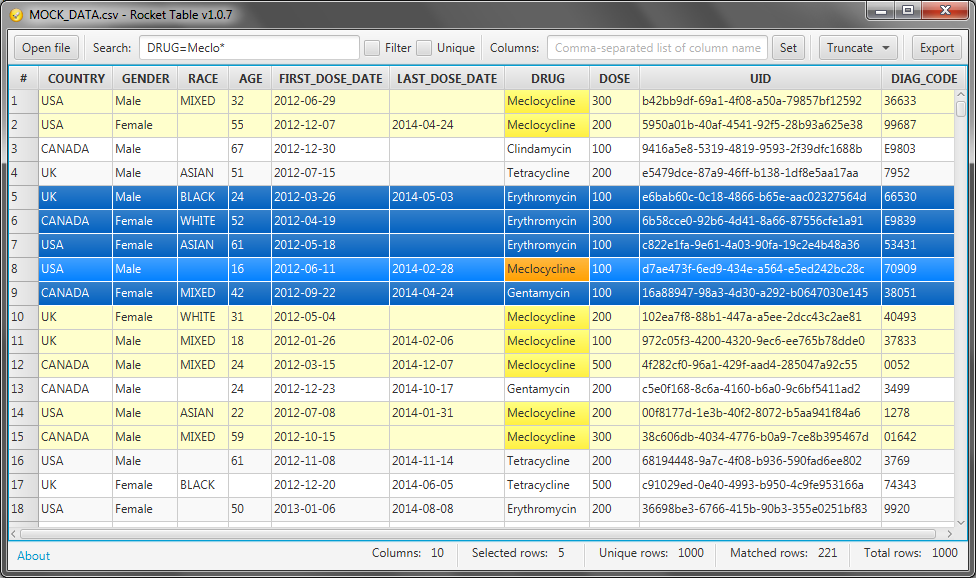
SBDF and STDF table viewer
As I mentioned in previous post - Rocket table supports not only SAS (.sas7bdat) files.
It also supports SBDF (Spotfire Binary Data File) and STDF (Spotfire Text Data File) file formats.
Now you do not have to have expensive Spotfire installed in your system. Just use Rocket table it is pretty fast and compact.


SAS table viewer
Couple of years ago I implemented viewer for SAS (.sas7bdat) files.
It was SAS Table Explorer.
Actually now it is not only viewer for SAS files, but it also supports other table formats.
I decided to rename that application to
Rocket Table and continue development under this new project.
06 February, 2017
Spring Boot plugin duplicates dependencies
Recently I found that Spring Boot Maven plugin duplicates some dependencies in the output war file. The problem with time-stamped snapshot dependencies (they have versions like "1.1-20170206.160055-1"). In this case Spring Boot plugin puts both "1.1-SNAPSHOT" and "1.1-20170206.160055-1" versions of jars. Like here:
demo-webapp-1.1-20170206.160055-1.war:\WEB-INF\lib\
                        demo-core-1.1-SNAPSHOT.jar
                        demo-core-1.1-20170206.160055-1.jar
This is not critical (application will work), but unpleasant.
The problem occurs with a Spring Boot Maven plugin version before 1.4.4. With 1.4.4 it works fine. So just switch plugin to the 1.4.4, even if you use are using an earlier version of Spring Boot.
<plugins>
    <plugin>
        <groupId>org.springframework.boot</groupId>
        <artifactId>spring-boot-maven-plugin</artifactId>
        <version>1.4.4.RELEASE</version>
    </plugin>
...
After that it will keep only one file per dependency:
demo-webapp-1.1-20170206.160055-1.war:\WEB-INF\lib\
                        demo-core-1.1-SNAPSHOT.jar
04 February, 2017
Install Arch linux in the VirtualBox
Precondition
- you have boot into the newly created virtual machine from the Arch live iso
Make new single partition using whole disk space
parted --script /dev/sda mklabel msdos mkpart primary 0% 100% set 1 boot on print
mkfs.ext4 /dev/sda1
Choose a fast mirror
Edit /etc/pacman.d/mirrorlist file, move your preferred server to the top of the file
Install base system
mount /dev/sda1 /mnt
pacstrap /mnt base
genfstab -p /mnt > /mnt/etc/fstab
Configure base system
arch-chroot /mnt
echo en_US.UTF-8 UTF-8 >/etc/locale.gen
localegen
echo LANG=en_US.UTF-8 >/etc/locale.conf
echo a1 >/etc/hostname
ln -s /usr/share/zoneinfo/UTC /etc/localtime
mkinitcpio -p linux
packman -S grub sudo mc bash-completion openssh
Configure network
ip link
systemctl enable dhcpcd@enp0s3.service
systemctl enable sshd.service
Create a user
useradd -m -g users -G wheel -s /bin/bash username
passwd username
Install boot loader
grub-mkconfig -o /boot/grub/grub.cfg
grub-install /dev/sda
Reboot
exit
umount /mnt
reboot
Enjoy your new Arch
Get Spring Boot sources
Spring Boot sources
Very often it is helpful for me to look into the Spring sources in order to understand how some internals work. Of course it is pretty simple to automatically download and view sources using IDE (like IntelliJ IDEA). But sometimes I need just plain source files.I get these files using "Maven Dependency Plugin" and this pom.xml file:
<?xml version="1.0" encoding="UTF-8"?>
<project xmlns="http://maven.apache.org/POM/4.0.0" xmlns:xsi="http://www.w3.org/2001/XMLSchema-instance"
    xsi:schemaLocation="http://maven.apache.org/POM/4.0.0 http://maven.apache.org/xsd/maven-4.0.0.xsd">
    <modelVersion>4.0.0</modelVersion>

    <groupId>io.github.xantorohara.springfield</groupId>
    <artifactId>spring-boot-sources</artifactId>
    <version>0.1</version>
    <packaging>pom</packaging>
    <name>spring-boot-sources</name>

    <parent>
        <groupId>org.springframework.boot</groupId>
        <artifactId>spring-boot-starter-parent</artifactId>
        <version>1.5.6.RELEASE</version>
        <relativePath/>
    </parent>

    <properties>
        <project.build.sourceEncoding>UTF-8</project.build.sourceEncoding>
        <project.reporting.outputEncoding>UTF-8</project.reporting.outputEncoding>
        <java.version>1.8</java.version>
    </properties>

    <dependencies>
        <!-- Spring Boot and Spring Framework libraries -->
        <dependency>
            <groupId>org.springframework.boot</groupId>
            <artifactId>spring-boot-starter-web</artifactId>
        </dependency>
        <dependency>
            <groupId>org.springframework.boot</groupId>
            <artifactId>spring-boot-starter-security</artifactId>
        </dependency>
        <dependency>
            <groupId>org.springframework.boot</groupId>
            <artifactId>spring-boot-starter-jdbc</artifactId>
        </dependency>
        <dependency>
            <groupId>org.springframework.boot</groupId>
            <artifactId>spring-boot-starter-data-jpa</artifactId>
        </dependency>
        <dependency>
            <groupId>org.springframework.boot</groupId>
            <artifactId>spring-boot-starter-cache</artifactId>
        </dependency>

        <!-- My current needs -->
        <dependency>
            <groupId>org.mybatis.spring.boot</groupId>
            <artifactId>mybatis-spring-boot-starter</artifactId>
            <version>1.2.0</version>
        </dependency>

    </dependencies>

    <build>
        <plugins>
            <plugin>
                <groupId>org.apache.maven.plugins</groupId>
                <artifactId>maven-dependency-plugin</artifactId>
                <version>3.0.0</version>
                <executions>
                    <execution>
                        <goals>
                            <goal>unpack-dependencies</goal>
                        </goals>
                        <configuration>
                            <classifier>sources</classifier>
                            <outputDirectory>target</outputDirectory>
                            <includeGroupIds>
                                org.springframework,
                                org.springframework.boot,
                                org.mybatis,
                                org.mybatis.spring.boot
                            </includeGroupIds>
                            <useSubDirectoryPerArtifact>true</useSubDirectoryPerArtifact>
                        </configuration>
                    </execution>
                </executions>
            </plugin>
        </plugins>
    </build>

</project>
mvn process-sources
Subscribe to:
Posts (Atom)